What is my username? There are a few ways to determine your username.
- Email as username: If your company set up your LUMEN account, then try using your work email as your username.
- Account information: Your account information (username / password) was sent to you from no-reply@lumentalent.com. Try searching for that email or see if it is in your spam filter. Your username will be in that email.
- Customer admin: Your customer administrator, who is an employee at your organization, can send you your username.
I forgot my LUMEN password, how do I reset it? There are a few ways you can reset your password.
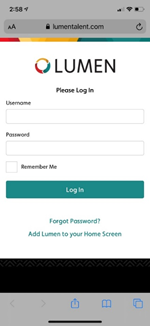
- Log-in screen: Go to the log in screen at lumentalent.com and can click on the phrase “Forgot Password?” which is toward the bottom of the log in screen.
- Account information: Your account information (username / password) was sent to you from no-reply@lumentalent.com. Try searching for that email or see if it is in your spam filter. Your password will be in that email.
- Customer admin: Your customer administrator, who is an employee at your organization, can send you your username.
I did not receive the email with my account information, what do I do?
- Account Information: Your account information is sent to you from no-reply@lumentalent.com. You may want to double-check for the email in your spam filter. This can happen even if IT has whitelisted the domain name.
- Customer Admin: If you are unable to locate your account information after checking your spam and clutter folders, then please reach out to your customer admin. Your customer admin is an employee at your organization.
- Direct Manager/HR: If after speaking to the customer admin you discover you do not have a LUMEN account, then please speak either to your direct manager or HR business partner to understand why this is the case.
Comments
0 comments
Please sign in to leave a comment.