What is a rating reminder? A rating reminder is available for a learner and a rater. The purpose is to prompt a user (learner or rater) to submit a rating on a given goal. For the learner it is an alert for a self-assessment rating. For the rater, it is to remind the rater to rate a learner on a given goal.
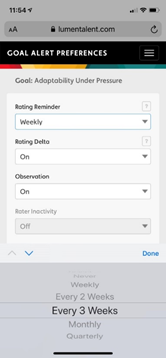
Left: This is the Goal Alert Preference screen which can be found by clicking on “edit alerts” at the bottom of the goal details page. This is the menu a learner will see when he/she goes to set a rating reminder.
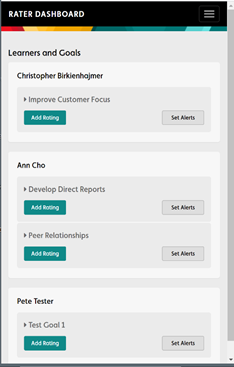
Right: This is the Rater Dashboard a rater views when he/she wants to set alerts and add a rating. The rater can set a different rating reminder frequency for each learner goal.
If you are a learner and would like more information, please visit Step-by-step Learner Guide and scroll to “goal alert preferences.”
If you are a rater and would like additional information, please go to Step-by-step Rater Guide and check out item 5, “set your alert preferences.”
How often will I receive rating reminders as a learner? As a rater? As a rater or learner, you will receive ratings based on the frequency you select when setting alerts. The frequency options for receiving a rating reminder are: Never, weekly, every 2 weeks, every 3 weeks, monthly and quarterly.
I want a different frequency setting for reminders than what is currently listed on the drop-down menu, how do I change the options? These reminder settings are configured. We make continuous improvements to our technology based on customer feedback. As a result, the menu options may change over time.
What is a delta alert? It is a goal alert preference for learners. It notifies a learner of a discrepancy between his/her rating and the rating from one of his/her raters. A discrepancy of 3-points in either direction is the threshold for the alert. As an example, if a learner rates herself a 4 on her goal of “Adaptability Under Pressure” and later that same week one of her raters submits an 8 for the same goal, then a delta alert (via email or text) will be sent to the learner. The notification will have a hyperlink that allows the learner to go right to the discrepant rating provided by the rater. The intention is to drive engagement and reflection for the learner regarding his/her ratings and the perspective of others. Exploring rating discrepancies can often lead to insight and learning.
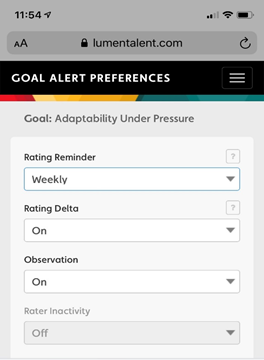
What is an observation alert? It is a goal alert preference for It notifies a learner when a rater has placed an Observation / Impact note into the rating system. As an example, if a learner receives a rating and an observation note from a rater on her goal “Adaptability Under Pressure” then she will receive (via email or text) a notification that an entry was made. The notification will have a hyperlink that allows the learner to go right to the observation note left by the rater. The intention is to drive engagement and reflection for the learner regarding his/her ratings and the perspective of others. An observation note can be extremely helpful to a learner because it may provide clues as to what he/she should “keep doing” or “do differently.” Additionally, if a note was left by a rater and a learner has a brief discussion at a later point about the rater’s observation, the details of the note may help refresh the rater’s memory.
What phone number should I use for notifications? If you are electing to receive notifications via text then please use a cell phone that you regularly monitor. Be sure the cell phone receiving notifications has the LUMEN web app loaded on the home screen.
What if I do not want to receive notifications as a learner? As a rater? As a coach?
As a Learner: To suppress all notifications, go to “edit alerts” for each of your goals. Then select “never” for rating reminders and select “off” for both the delta and observation alerts.
As a rater: To suppress your rating reminder notifications, go to your rater dashboard, select “set alert” for a specific goal and select “never” for that learner’s goal. If you are a rater and would like additional information, please go to Step-by-step Rater Guide and check out item 5, “set your alert preferences.”
As a coach: If the learner has granted you access to his/her data, then you will receive all the alerts set by the learner for each of his/her goals. There are many benefits to receiving notifications as the learner’s coach. The reminders keep you more “present” in the learner’s development goals A notification may help you reinforce a particular action (or inaction) taken by the learner you are coaching. Moreover, the coach receives the real-time perspective from other colleagues in the learner’s environment and allows the coach to respond accordingly.
Comments
0 comments
Please sign in to leave a comment.