Reviewer
What should I do if I don’t see the learner whose goal and profile I am to review?
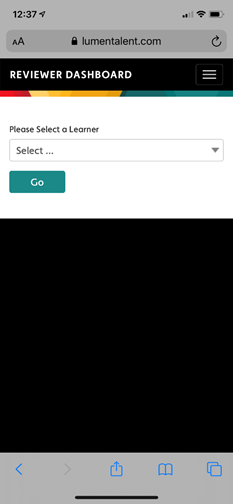
When you are at your reviewer dashboard, you can open the drop-down menu and select the rater whose goal and other information you want to review. If the person does not show up in the drop-down we suggest you contact your company administrator to (a) double check that you are listed as a reviewer in the LUMEN app and (b) make sure you were added as a reviewer for the specific learner who you are looking to review.
Can a learner provide self-assessment ratings on a goal even if I haven’t reviewed?
Yes. LUMEN is aimed at enabling feedback to learners as quickly as they care to receive it. They will be able to modify the goal with feedback you provide to them about their goals, key actions, selected raters, etc. That feedback will be very helpful to them. In the interim the learner can still start his/her journey without having to wade through unnecessary bureaucracy.
I have feedback for the learner on goals and/or profile, can I send an in-app message? Not yet but soon. We expect to be adding in app communication between reviewer and learner, as well as coach and learner. For now, any perspective you have on making their goal more meaningful or having the ideal raters will have to happen outside of LUMEN.
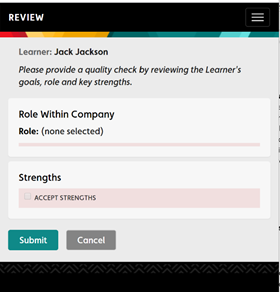
I tried to accept strengths (or goal or profile) and get a “don’t” icon. What does this mean? The icon simply means that the learner has not completed that particular section. All incomplete learner information will show as a pink highlight (see image below) or a “don’t smoke” type of icon.

During your next meeting with the learner, you may want to ask him/her to complete their profile and goals. You or an HR staff member may need to provide additional support/coaching to help him/her finish up.
Can a learner receive ratings from other raters if I have not “accepted” his/her goal? Yes, but only if the learner has (a) drafted and saved a goal and (b) assigned raters to the goal. You may guide the learner to add different raters than he/she currently has. Keep in mind one of our founding premises of LUMEN is aimed at enabling feedback to learners as quickly as they care to receive it. They can still make changes to their goals based on your input and still retain feedback that had prior to making changes.
Why can’t I accept certain categories in the learner’s profile for which I am a reviewer?
If you are unable to accept certain categories in the learner’s profile, it means they have not completed that section. During your next meeting with the learner, you may want to ask him/her to complete their profile and goals. You or an HR staff member may need to provide additional support/coaching to help him/her finish up.
Coach
Why can’t I add a rating for a learner I am coaching?
A coach is granted “read only” access to the learner’s data. What this means is that you can see all ratings, comments and data trends the learner sees. You will also receive notifications based on the alerts he/she has programmed for each goal. The coach role is not able to add ratings. If you are an internal mentor/coach and want to be added as a rater, please (a) discuss with the learner and (b) work with your customer admin to turn on “rater” role on your account. After your rater role is activated on your account, then the learner must add you as a rater for that specific goal. Step 8 in this article shows the learner how to add raters: https://help.lumentalent.com/hc/en-us/articles/360036147912-Getting-started-A-step-by-step-guide-to-launch-your-LUMEN-experience-Learners
Can I export learner data?
As a coach, you are unable to export learner data. A coach is granted “read only” access to the learner’s data. The learner can export his/her data for you if you would like to look at trends in the quantitative and qualitative data.
Why can’t I see a learner’s goals and data for the person I am coaching? There are 2 primary reasons why you might not be seeing the data of a learner who you are coaching: (a) you are not assigned to the learner as his/her coach in the LUMEN system or (b) you have not been granted permission by learner.
- Not assigned as coach: You may not be assigned as the coach for the learner – please check with the customer admin at the company to make sure you were designated as coach for that learner.
- Permission: Your learner may not have granted you permission to see his/her data – please discuss this option directly with the learner whom you are coaching
Why am I receiving notifications about learners I am coaching?
If the learner has granted you access to his/her data, then you will receive all the alerts set by the learner for each of his/her goals. There are many benefits to receiving notifications as the learner’s coach. The reminders keep you more “present” in the learner’s development goals. A notification may help you reinforce a particular action (or inaction) taken by the learner you are coaching. Moreover, the coach receives the real-time perspective from other colleagues in the learner’s environment and allows you to respond accordingly.
Comments
0 comments
Please sign in to leave a comment.